Красивая маленькая куколка (есть выкройка) Красивая маленькая куколка ...
Тильдомания.Тильды феи,балерины,принцессы и солдатики.Выкройки и Мк - (0)Тильдомания.Тильды феи,балерины,принцессы и солдатики.Выкройки и Мк ♦ МИР ТИЛ...
Нежные девочки Онешко Екатерины - (0)Нежные девочки Онешко Екатерины ♦♦♦ Нежные девочки Онешко Екате...
Тыквоголовка Рождественская. Мастер класс. Часть 1 - (0)Тыквоголовка Рождественская. Мастер класс. Часть 1 http://masterclassy.ru/shite/shite-igrushek/66...
Принцесса на горошине.Выкройка - (0)Принцесса на горошине.Выкройка Принцесса на горошине.Выкройка ...
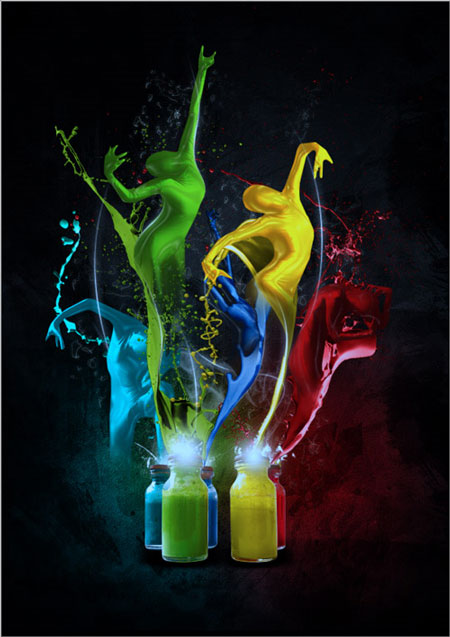
Экспрессивный танец красок |
В этом уроке мы с помощью программы Фотошоп создадим танец красок!
Шаг 1. Создайте документ (Ctrl+N) размером 595×842пикс. Восстановите цвета по умолчанию, нажав клавишу D, а затем залейте документ чёрным цветом (Alt+Backspace). Создайте новый слой, назовите «серое пятно». Выберите инструмент «Кисть»  (Brush tool) с мягкими краями, размер 600px и цвет #333333, и кликаем один раз в центре документа

Шаг 2. Используя метод, приведённый выше, нарисуйте ещё несколько пятен

Шаг 3. Нам понадобится текстура, перенесите на наш документ, примените Изображение\Коррекция\Обесцветить (Image\ Adjustments\Desaturate), режим наложения для слоя поменяйте на «Перекрытие» (Overlay)

Шаг 4. Теперь нам понадобится изображение с банками краски, отделите их от фона и поместите в наш документ, назовите слой «баночки»

Шаг 5. Создайте новый слой, назовите «тени», расположите слой под слоем «баночки» и мягкой кистью чёрным цветом нарисуйте тени от баночек

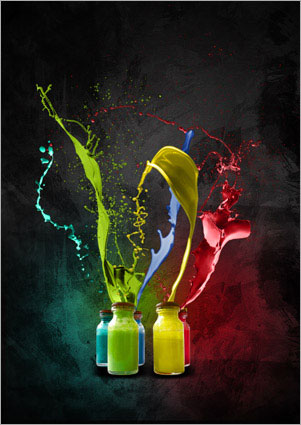
Шаг 6. В этом шаге нам понадобятся брызги краски. Инструментом «Волшебная палочка»  (Magic Wand Tool) кликните один раз на белом фоне и следуем в меню Выделение\Подобные оттенки (Select\Similar), чтобы выбрать все белые области, далее Выделение\Инверсия (Select\Inverse) и копируем выделение Ctrl+J, переносим в наш документ, уменьшаем размер при помощи свободной трансформации (Ctrl+Т)

Шаг 7. Поменяем цвет в меню Изображение\Коррекция\Цветовой тон-Насыщенность (Imag\ Adjustments\ Hue/Saturation), поставьте галочку «Тонирование» (Colorize) и установите красный цвет. Клик ПКМ по слою и выберите «Параметры наложения» (Blending Options) и примените стиль «Внутреннее свечение» (Inner Glow)

Шаг 8. Сделайте ещё брызги красок для каждой бутылочки, применяя технику, описанную выше
Шаг 9. Теперь нам понадобятся танцующие фигуры, отделите изображение от фона и перенесите на наш документ

Шаг 10. Поменяем цвет в меню Изображение\Коррекция\Цветовой тон-Насыщенность (Imag\ Adjustments\ Hue/Saturation), поставьте галочку «Тонирование» (Colorize) и установите синий цвет

Шаг 11. Далее в меню Фильтр\Имитация\Целлофановая упаковка (Filter\Artistic\Plastic Wrap)

Шаг 12. Уменьшите размер фигуры и инструментом «Ластик»  (Eraser tool) сотрите нижнюю часть фигуры

Шаг 13. Повторите предыдущие шаги для других фигур

Шаг 14. Создайте новый слой, назовите «свечение», инструментом «Кисть» (Brush tool) с мягкими краями, размер 50px, цвет белый нарисуйте точку на крышках бутылок


Шаг 15. Скачайте кисточки и нарисуйте брызги белым цветом рядом с пятнами на крышках

Шаг 16. Нам понадобятся изображения с дымом (вы можете использовать любые другие). Создайте новый слой ниже слоя «бутылочки» и назовите «дым», поместите на этот слой изображение с дымом и уменьшите непрозрачность (Opacity) для слоя 40%

Шаг 17. Создайте новый слой ниже слоя «дым» и назовите его «каракули», инструментом «Кисть» (Brush tool), жёсткость 100%, размер 2 рх, цвет белый, нарисуйте каракули по всему документу

Шаг 18. Поместите слой «каракули» ниже слоя с фигурой и уменьшите размер. Примените стиль слоя «Внешнее свечение» (Outer Glow)

Шаг 19. Дублируйте слой «каракули» несколько раз и расположите их вокруг танцующих фигур

Шаг 20. Создайте новый слой и назовите «линии». Инструментом «Перо»  (Pen tool) нарисуйте кривую, кликаем ПКМ и выберите «выполнить обводку контура» (Stroke Path), кисть (жёсткость 100%, размер 2 рх, цвет белый), поставьте галочку «Имитировать нажим» (Simulate Pressure), примените стиль слоя «Внешнее свечение» (Outer Glow), настройки по умолчанию

Шаг 21. Создайте новый корректирующий слой Фотофильтр (Adjustment Layer Photo Filter) выше всех слоёв, выберите Охлаждающий фильтр (82) (Cooling Filter (82)) и плотность (density) 25%

Шаг 22. Создайте новый корректирующий слой Уровни (Levels Adjustment Layer)

И в результате танцующие краски!

Автор: Johnson Koh
Перевод: Оксана Гудкова
Ссылка на источник
Источник: http://photoshop-files.3dn.ru/load/ehkspressivnyj_tanec_krasok/5-1-0-394
| Рубрики: | Уроки коллажа |
| Комментировать | « Пред. запись — К дневнику — След. запись » | Страницы: [1] [Новые] |


