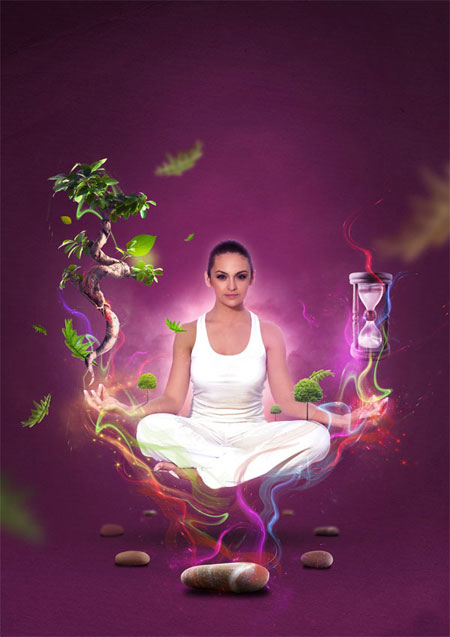
Создаём в Фотошоп иллюстрацию, наполненную магией |
В этом фотошоп-уроке мы затронем методы комбинации разных фотографий и текстур для создания насыщенного цветного сюрреалистического изображения. Этот урок будет полезен и тем, кто владеет Фотошопом на среднем уровне, и продвинутым пользователям программы. Мы будем использовать маски слоя, кисти, сделанные из изображения, корректирующие слои и т.д.
Превью
Изображения, используемые в уроке
Стоковое изображение: Йога
Стоковое изображение: Черно-белые облака
Стоковое изображение: Песочные часы by Aleksandra P .
Шаг 1: Выделение и подготовка объектов для коллажа
Начните с поиска стоковых фотографий, на которых изображен кто-то медитирующий или занимающийся йогой. Я приобрел это стоковое фото на Bigstock, которое называется Йога на Карибах .
Отделите объект от фона, используя вашу любимую технику выделения. Я делал это при помощи инструмента Перо  (Pen tool), так как фон на фото неоднородный. Белый и цельный фон должен быть удален, чтоб мы дальше могли продолжать работать с изображением, помните это, выбирая стоковое фото.
Шаг 2: Создание базового фона
Создайте документ с размерами 1000Х1415 пикселей, залейте слой пурпурным цветом (#4f193d). Поместите выделенную девушку в документ, отцентрируйте по горизонтали.

Мягкой кистью  (Brush tool) (B) нарисуйте белые области внизу изображения на новом слое, который находится выше фона. Поставьте цвет переднего плана черный, создайте новый слой и закрасьте черным область вверху, создавая вогнутый эффект.

Слою с белым и черным цветом установите режим наложения (blending mode) Перекрытие (Overlay) с непрозрачностью (opacity) 50%.
Шаг 3: Добавление фону более интересного эффекта
Мы должны еще поработать с фоном, сделать его более интригующим. Сперва , нужно добавить светлое пятно позади девушки. Для этого создайте новый слой, расположите его ниже слоя с медитирующей девушкой, круглой мягкой кистью (brush) (B) белого цвета кликните один раз. Установите слою режим наложения (blending mode) Перекрытие (Overlay). Это разнообразит фон, чтоб он не был покрыт сплошным пурпурным цветом.
Найдите подходящую текстуру бумаги. Попробуйте набор картонок с сайта Design Instruct . Какую б текстуру вы не выбрали, вы должны сделать ее еле уловимой и ненавязчивой, изменив режим наложения (blending mode); попробуйте Мягкий свет (Soft light) с непрозрачностью (opacity) 20%.

Шаг 4: Создание тени под девушкой
Мы будем создавать тень под главным объектом нашей композиции, чтоб добиться эффекта парящей над землей девушки. На новом слое, который находится выше фонового, мягкой черной круглой кистью (brush) (B) нарисуйте круг. При помощи Свободной трансформации (Free transform) (Ctrl/Cmd+T) cплющит круг. После этого, измените непрозрачность слою примерно до 70%.

Шаг 5: Создание кисти облаков
Сейчас мы должны сами создать кисть. Найдите стоковое фото каких-то красивых облаков (посмотрите эту коллекцию облаков на Six Revisions ).
Откройте выбранное изображение с облаками в Фотошоп, обесцветьте его – Изображение>Коррекция>Обесцветить (Image>Adjustments>Desaturate) или при помощи сочетания клавиш Shift+Ctrl/Cmd+D. Используя Уровнеи (Levels) Изображение>Коррекция>Уровни (Image>Adjustments>Levels) (Ctrl/Cmd+L) подкорректируйте изображение, придав ему интересный эффект.
Я добился такого результата (вы можете загрузить его, если хотите).

Инструментом Прямоугольная область  (Rectangular Marquee Tool) (M) создайте выделение вокруг частей изображения с облаками, далее идите в Редактировать>Определить кисть (Edit>Define Brush Preset) и сохраните кисть, дав ей название.
Нажмите F5 или Окно>Кисти (Window>Brushes) чтоб открыть палитру кистей. Найдите вашу сохраненную кисть и примените к ней подходящие настройки (Динамика формы - Shape Dynamics, Рассеивание – Scattering и другие).
Установите цвет переднего плана белый. Создайте новый слой за девушкой. Кистью (Brush) (B) с облаками кликните по холсту.

Шаг 6: Добавление магических камней
Найдите интересные предметы и объекты, подходящие к магической тематике, к которой мы стремимся. Например, найдите стоковые фотографии камней, которые будут вписываться в наше изображение.
Вот пример камней, которые вы можете их использовать: Stones at a Pier .
Просто вырежьте камни инструментом Перо (Pen tool) (P) в режиме Контуров (Paths), конвертируйте контур в выделение, кликнув правой кнопкой мыши по изображению и выбрав из выпадающего меню Создать выделение (Make Selection), скопируйте выделенные камни в наш рабочий файл.
Разместите камни под девушкой, учитывая перспективу и их отдаленность. Создайте тени под камнями, так как мы это делали с тенью от девушки (мягкая круглая черная кисть – brush, Свободная трансформация – Free Transform для сплющивания).

Если камень не на переднем плане, то используйте Фильтр>Размытие>Размытие по Гауссу (Filter>Blur>Gaussian Blur) с разными настройками радиуса, чтоб создать иллюзию отдаленности и эффект глубины изображения.

Шаг 7: Добавление листьев
Найдите несколько стоковых фото листьев, разместите их в изображении близко к главному объекту – в нашем случае это девушка. Учитывайте перспективу и глубину.

Шаг 8: Создание эффекта космического свечения на руках девушки
Для эффекта космического свечения на руках девушки нужно найти красивое стоковое фото космической туманности или абстрактного вида космоса; например, посмотрите это с Shutterstock . Вы также можете попробовать изображение с Wikimedia Commons:
Tarantula nebula detail .


Откройте ваше изображение космоса и выделите самую красивую часть, в которой есть много чего интересного. Скопируйте выделение и вставьте на вершину рук девушки. Установите режим наложения слоям с космосом Экран (Screen). Возможно, какие-то части светового эффекта будут выглядеть грубо и неизящно, поэтому вы можете воспользоваться инструментом Ластик  (Eraser Tool) (E) или маской слоя, чтоб убрать нежелательные части.

Шаг 9: Создание космического светового эффекта
Мы будем создавать классный яркий дымчатый световой эффект, который исходит из камня перед девушкой, делая изображение магическим и мистическим.
Мы можем использовать те же фотографии космоса, которые были у нас в предыдущем шаге.
Выберите часть текстуры, которая напоминает дымчатый эффект, создайте выделение вокруг нее. Разместите эту часть выше всех слоев. Идите в Изображение>Коррекция>Цвет/Насыщенность (Image > Adjustments > Hue/Saturation), поставьте галочку на Цветность (Colorize), примените цвет, который вам нравится – красный, зеленый, желтый и т.п.

Измените режим наложения на Экран (Screen). Идите в Фильтр>Пластика (Filter>Liquify) и измените дымку так, чтоб казалось, будто она тянется из камня вверх. Сделайте это несколько раз, используя разные цвета и варианты трансформации.

Шаг 10: Добавление дизайнерских элементов для остаточного завершения
Пришло время для завершения нашего магического изображения. Мы можем сделать сцену более привлекательной при помощи добавления большего количества дизайнерских элементов. Я решил добавить дерево (слева) и песочные часы (справа).
Для работы с песочными часами сперва нужно их обесцветить (Shift+Ctrl/Cmd+U). После этого примените Изображение>Редактирование>Цветовой баланс (Ctrl/Cmd+B), чтоб подогнать изображение под фон – больше голубых тонов, меньше зеленых.

При помощи техник, которые мы использовали в предыдущих шагах, добавьте больше листьев и световых эффектов на новых элементах вашего дизайна.
Резюме урока
Урок графического дизайна затрагивает использование разных техник, при помощи которых можно собрать несколько графических элементов в одно гармоничное изображение. Мы создали интересный фон, используя преимущественно Кисть (Brush) (B), режимы наложения, самостоятельно сделанную кисть облаков и т.д. Мы добавили камней и листочков, обращая внимание на глубину изображения, размывая объекты фильтром Размытие по Гауссу, которые по идее отдалены от нас (Gaussian Blur). Фильтром Пластика (Liquify filter) мы создавали световые эффекты из текстур с космической туманностью, используя стоковые изображения космоса.

(нажмите на изображение, чтобы увеличить)
Автор: Wojciech Magierski
Переводчик: Мирошниченко Валерия
Ссылка на источник
Данный урок подготовлен для Вас командой сайта http://www.photoshop-master.ru
| Рубрики: | для Юли/программы |
| Комментировать | « Пред. запись — К дневнику — След. запись » | Страницы: [1] [Новые] |


