девушка со свечой |
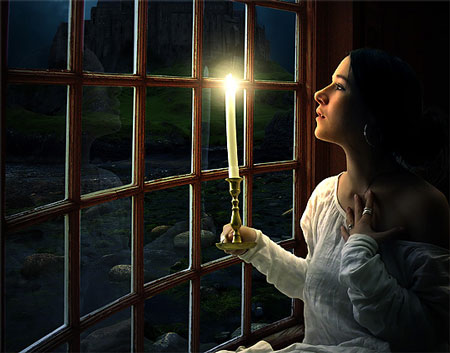
Нам понадобятся материалы:
Девушка
Окно
Замок
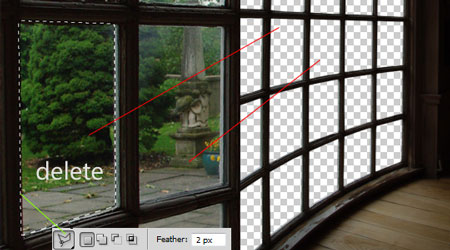
Шаг 1. Мы начнем с изображения «Окно». Откройте его в Photoshop. Сделайте 2 щелчка по слою и назовите его «Window». Инструментом Polygonal Lasso Tool  (L) (Полигональное лассо)выделите все стекла и удалите их нажав на Delete.
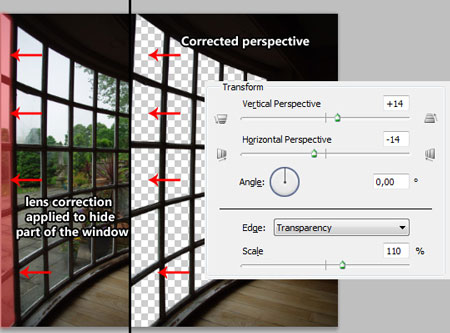
Шаг 2. Мне не совсем понравилось, как это окно расположено в перспективе. Давайте немного изменим это.
Перейдите в меню Filter>Distort>Lens Correction (Фильтр – Искажение – Коррекция дисторсии) и выставите такие настройки:
Vertical Perspective (Вертикальная перспектива) = +14,
Horizontal Perspective (Горизонтальная перспектива) = -14
Scale (Размер) = 110%
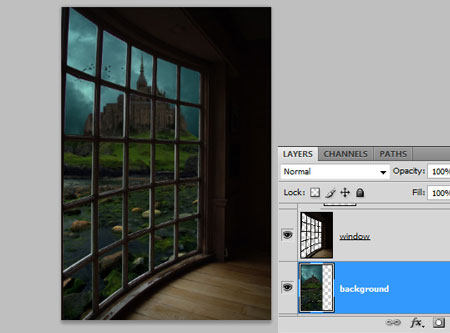
Шаг 3. Откройте изображение «Замок» и перетащите его на наш холст. Слой назовите «Background» и расположите его ниже слоя «Window». Нажмите Ctrl+T для того, чтобы трансформировать изображение и уменьшите масштаб до 35%. Расположите замок, как показано на примере ниже:
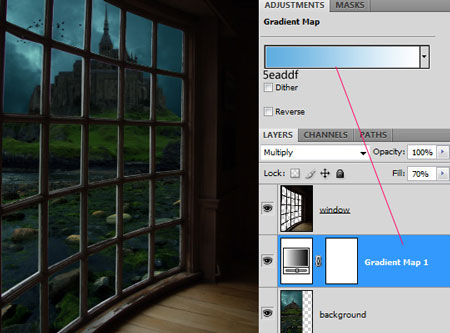
Шаг 4. Создайте новый корректирующий слой над слоем «Background». Вы можете это сделать через меню Layer>New Adjustment Layer>Gradient Map (Слой – Новый корректирующий слой – Карта градиента) или просто нажмите на черно-белую иконку в палитре слоев и выберите Gradient Map (Карта градиента)
Используйте бело-голубой градиент, показанный на рисунке ниже. (Чтобы изменить цвета градиента, щелкните на сам образец градиента и в окне с настройками, сделав щелчок по маркерам под градиентом, поменяйте их цвет). Поменяйте Blending Mode (Режим смешивания) слоя на Multiply (Умножение), а Fill (Заполнение) уменьшите до 70%
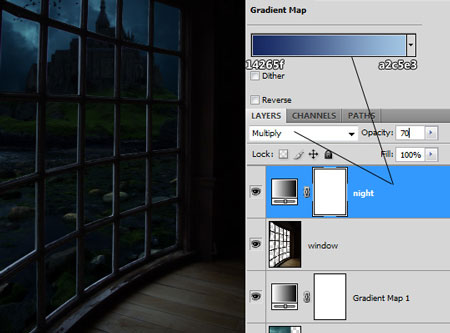
Шаг 5. Сейчас мы сделаем коррекцию для всей сцены, чтобы казалось, что событие происходит в ночное время. Над слоем «Window» создайте еще один корректирующий слой Gradient Map (Карта градиента). Используйте цвета градиента, показанные на рисунке ниже. Поменяйте Blending Mode (Режим смешивания) слоя на Multiply (Умножение), а Fill (Заполнение) уменьшите до 70%. Я назвал этот слой «Night»
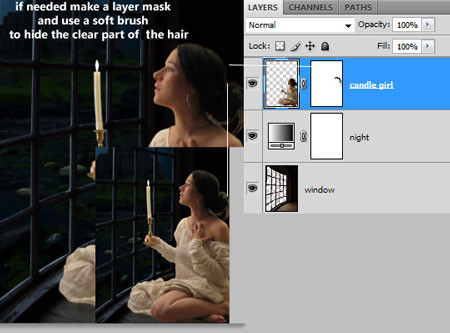
Шаг 6. Откройте изображение «Девушка». Любым из инструментов выделения выделите девушку. Правую часть можно выделять не очень старательно, потому что она у нас потом будет затемнена. Перетащите девушку на наш холст. Уменьшите размер до 45 %. Слой назовите «Candle girl» и расположите выше всех других слоев.
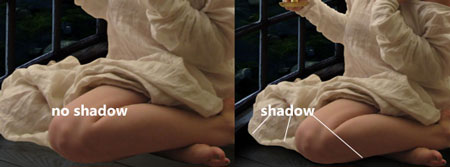
Шаг 7. В этом шаге мы добавим тень девушки на полу и начнем менять цвет. Создайте новый слой под слоем «Candle girl» и назовите его «Girl shadow». Возьмите инструмент Brush  (Кисть) (B) с параметрами:
Diameter (Диаметр) = 110 px
Hardness (Жесткость) = 15%
Цвет = черный
Проведите несколько раз по полу, чтобы получить тень, как показано ниже:
Теперь нам нужно осветить лицо девушки. Я покажу вам один прием, который ускорит эту работу.
Продублируйте слой с девушкой «Candle girl» нажав Ctrl+J. Слой назовите «Light». Преобразуйте этот слой в обтравочную маску: удерживая клавишу Alt, сделайте щелчок между слоями «Light» и «Candle girl. Fill (Заполнение) уменьшите до 0%. Затем добавьте эффект Inner Shadow (Внутренняя тень) с параметрами, показанными ниже на картинке.
После создания эффекта добавляете маску, щелкнув на значок маски на палитре слоев. И кисточкой с черным цветом скрываете тень на правой части изображения, внизу и на ткани.
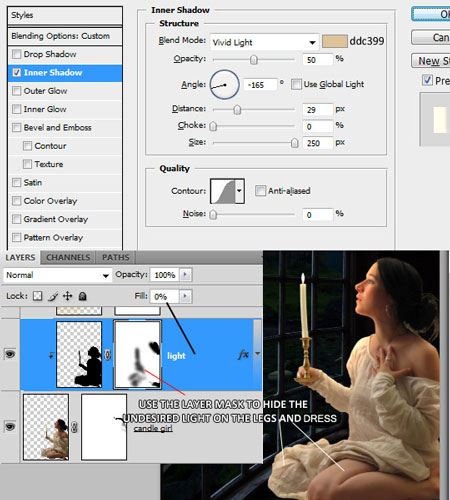
(Vivid Light – Яркий свет).
Шаг 8. Пока девушка не совсем сочетается с окружающим фоном. Сейчас мы приложим все усилия, чтобы изображение выглядело реалистично. На этом этапе мы будем работать только с обтрабочными масками, чтобы цветокоррекция действовала только на слой с девушкой (О создании обтравочной маски рассказывается в предыдущем шаге).
Создайте новый слой над слоем «Light». Воспользуйтесь инструментом Gradient Tool  (G) (Градиент) чтобы создать градиент.
Цвет левого маркера: #d2ba62
Opacity левого маркера: 100%
Цвет правого маркера: #ffffff
Opacity правого маркера: 100%
Тип градиента: Radial (Радиальный)
Создайте градиент как показано на рисунке ниже и поменяйте Blending Mode (Режим наложения) слоя на Soft Light (Мягкий свет).
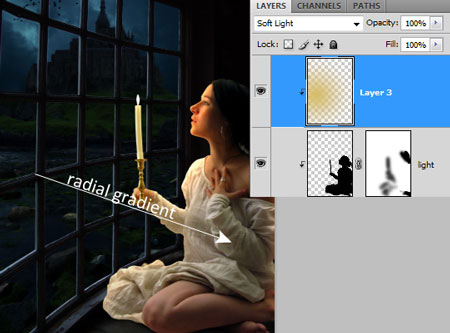
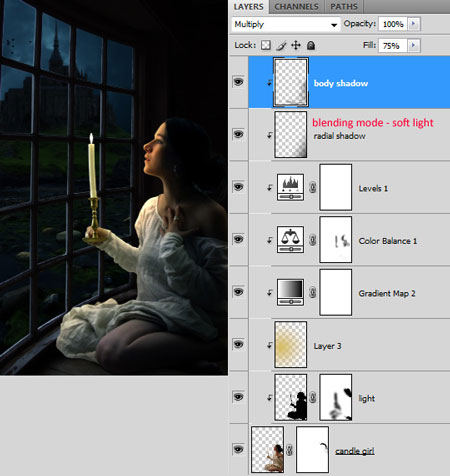
Создайте еще одну обтравочную маску в виде корректирующего слоя Gradient Map (Карта градиента). Цвет градиента показан на картинке. Поменяйте Blending Mode (Режим смешивания) слоя на Multiply (Умножение), а Fill (Заполнение) уменьшите до 75%
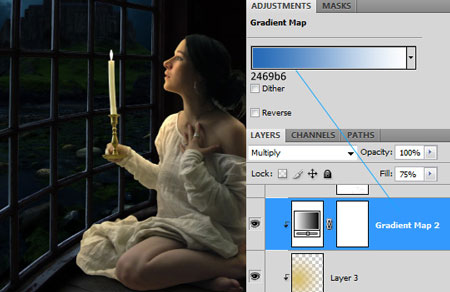
Теперь давайте настроим общий цветовой тон девушки. Создайте обтравочную маску в виде корректирующего слоя Color Balance (Цветовой баланс). Измените настройки так, как показано на изображении ниже:
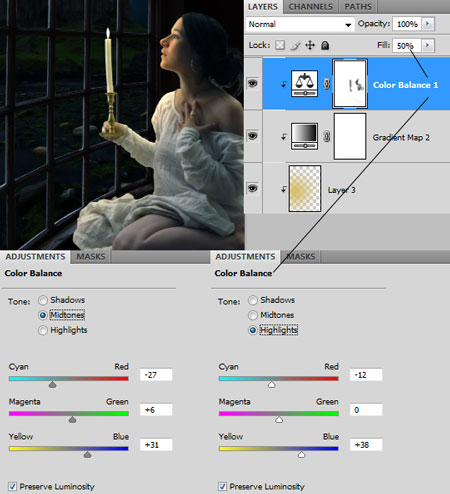
Также к этому слою я добавил маску и скрыл области на правой руке, свечке и ногах.
Создадим еще один корректирующий слой Levels (Уровни) и сделаем его обтравочной маской. Этот слой сделает девушку темнее, как будто она действительно находится в темной комнате:
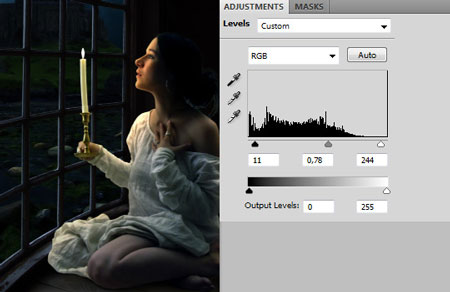
Сейчас изображение выглядит неплохо. Но нужно еще кое-что добавить. Хотелось бы скрыть светлое пятно на плече девушки, а также часть левой руки, чтобы акцентировать внимание на лице.
Я добавил еще один слой, сделал его обтравочной маской и создал на нем радиальный градиент. Я протянул градиент от правого нижнего угла холста к лицу и поменял режим наложения на Soft Light (Мягкий свет).
Также я создал еще один слой, на котором мягкой кистью затемнил конкретные области. Режим наложения слоя - Multiply (Умножение).
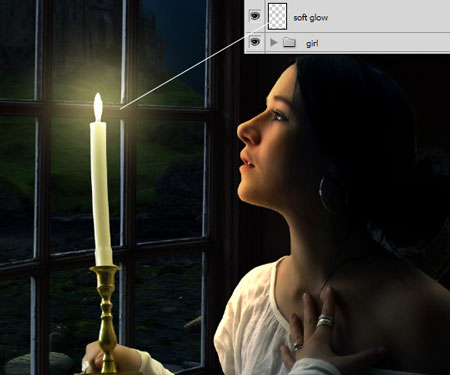
Шаг 9. Свеча кажется несколько безжизненной. Давайте добавим вокруг неё свечение.
Создайте новый слой выше всех других слоев и назовите его «Soft glow».
Возьмите кисть с параметрами:
Diameter (Диаметр) = 300 px
Hardness (Жесткость) = 0%
Цвет = # b8a76b
И щелкните один раз, чтобы сделать свечение вокруг свечи.
Поменяйте Blending Mode (Режим смешивания) слоя на Linear Dodge
(Линейный осветлитель)
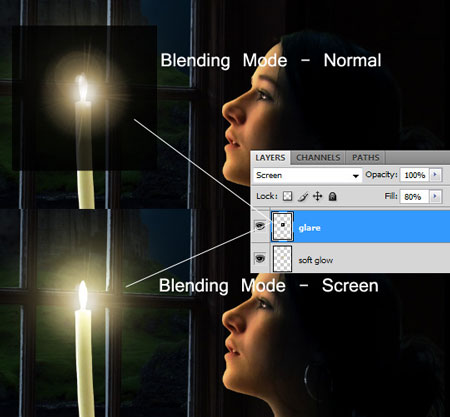
Мы можем сделать сияние еще лучше, добавив фильтр. Создайте черный прямоугольник на новом слое. Слой назовите «Glare». Далее применяете Filter> Render> Lens Flare (Фильтр- Рендеринг – Блик). Выберите первый вариант блика – 50-300 mm zoom. Поменяйте Blending Mode (Режим смешивания) слоя на Screen (Осветление):
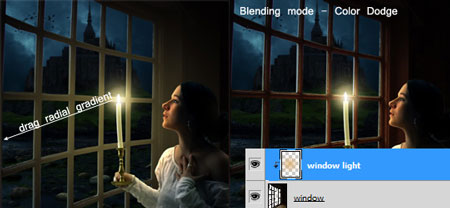
Шаг 10. Для того, чтобы сцена выглядела еще более реалистично, нужно добавить свет от свечи и на оконную раму также. Над слоем «Window» создайте новый слой, и назовите его «Window light». Преобразуйте слой в обтравочную маску. На слое создайте прозрачный радиальный градиент с цветом #d8ac4f. Поменяйте Blending Mode (Режим смешивания) слоя на Color Dodge
(Осветление основы)
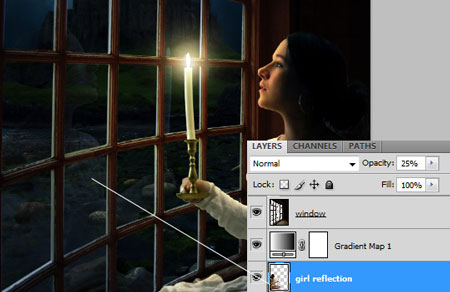
Шаг 11. В этом шаге давайте добавим отражение в стекле. На самом деле делается он очень просто. Продублируйте слой с девушкой «Candle girl». Отразите его по горизонтали и измените Opacity (Непрозрачность) слоя на 25%. Слой назовите «Girlreflections» и расположите его над слоем «Background»:
Шаг 12. Мы можем добавить виньетки, чтобы привлечь внимание к центру изображения. Создайте новый слой поверх всех слоев на палитре. Выберите инструмент Rectangular Marquee Tool  (M) (Прямоугольная область).Измените параметр Feather (Растушевка) на верхней панели до 150 px. Этим инструментом выделите весь холст. Вы увидите закругленные углы из-за установленной растушевки. Инвертируйте выделение, нажав Ctrl+Shift+I. Залейте выделенную область, выбрав меню Edit – Fill (Редактирование – Заливка). В списке Use (Использовать) выберите цвет Black (Черный).
Поменяйте Blending Mode (Режим смешивания) слоя на Soft Light (Мягкий свет)
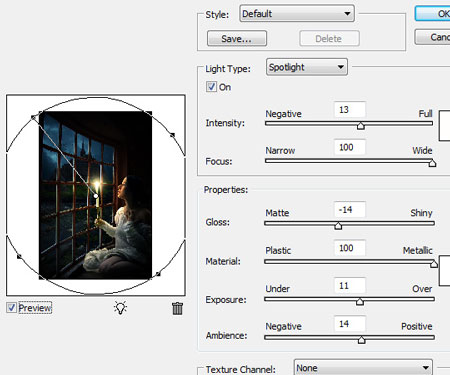
В самом конце я свел все слои в один отдельный слой, нажав Ctrl+Shift+Alt+E. И применил фильтр Filter> Render> Lighting Effects (Фильтр- Рендеринг – Эффект освещения) с настройками, как показано ниже:
Автор: Andrei Oprinca
Переводчик: Бабушкина Оксана
Ссылка на источник
| Рубрики: | КОМПЬЮТЕР |
| Комментировать | « Пред. запись — К дневнику — След. запись » | Страницы: [1] [Новые] |


