Среда, 29 Сентября 2021 г. 07:05
+ в цитатник
UPDATE! NOW AVAILABLE FOR DOWNLOAD. Thanks to those who showed their support by way of commenting and faving. Keep it up! 
It provides the motivation to continue and improve. Almost hit the 200 mark, as promised it is the 1st of October so happy downloading. 
Let's see how this turns out.

For those truly interested it's ready. I'm hoping to drum up some more interest and activity in the area of Windows Customization.
To show your support please click the fave button to show your appreciation for the work or kindly
donate.. Thanks.

**********FOR A LIMITED TIME! GET IT EXCLUSIVE ON THE
WINTHEMERS DISCORD SERVER!**********
Here's my take on a port of Kimi by EliverLara as previewed in the screenshot here.
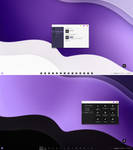
Includes with or without address bar (until maximized). As well as light and dark mode support.
The preview is of Windows 11, the screenshot is of Windows 10. So working it's working fine on both.
Font | Source Code Pro
Ъ STUFF YOU SHOULD CHECK OUT...
� Requirements
K FAQ
- My caption buttons haven't changed.
Check your patching method FAQ and make sure to place the themes in the proper directory. Retrace the guides steps!For Windows 10 users Stardock Curtains is required for this. And only the top caption bars are rounded.
- My task manager/control panel is still light/white
There is no forced dark theme only light or regular dark mode support. 
https://www.deviantart.com/niivu/art/Kimi-for-Windows-893287803
-
Запись понравилась
-
0
Процитировали
-
0
Сохранили
-


