Кардиган крючком вертикальной резинкой. Дизайн и исполнение: Евгения Теплова - (0)
Листовая горчица | Советы садоводам - (0)
Как сажать укроп, посев семян, сорта | Советы садоводам - (0)
Как заготовить петрушку на зиму | Советы садоводам - (0)
Когда сажать петрушку, сроки, правила | Советы садоводам - (0)
Как это может быть так просто? ❤️ Вам понравится шить эту юбку! СЛОВА АВТОРА:...
Шорты на любой вкус: шьём и вяжем 3 стильные модели - (0)Шорты на любой вкус: шьём и вяжем 3 стильные модели Слова автора: Хочешь обновить гардероб ...
ОРИГИНАЛЬНЫЕ БРЮЧКИ НА ЛЕТО - (0)ОРИГИНАЛЬНЫЕ БРЮЧКИ НА ЛЕТО Источник ...
5 потрясающих и простых юбок без выкройки ✂️ Сшейте юбку сами дома! - (0)5 потрясающих и простых юбок без выкройки ✂️ Сшейте юбку сами дома! В этом вид...
Как аккуратно и легко сшить рукав с оборкой🦋 Советы и хитрости по пошиву летящих рукавов («бабочка») - (0)Как аккуратно и легко сшить рукав с оборкой🦋 Советы и хитрости по пошиву летящих рукавов («...
ПОДРОБНОЕ ПОСОБИЕ ПО РАБОТЕ С ГРАФИЧЕСКИМ РЕДАКТОРАМИ PCSTITCH |
Если раньше изготовление схем в таких видах декоративно-прикладного искусства как вышивание, бисероплетение, вязание требовало немало времени и усилий, то сегодня любую схему можно выполнить всего за несколько минут, если воспользоваться специально созданными для этого графическими редакторами.


Графический редактор PCStitch является доступным и удобным средством создания сложных схем для вышивания крестом. Он позволяет автоматически преобразовывать любые изображения (фотографии или рисунки) в схемы, редактировать готовые схемы и набирать схемы самостоятельно. В программе PCStitch можно также создавать схемы для вязания и бисероплетения (техники “ткачество”, параллельное плетение).
автор Стебунова Светлана Фёдоровна
Дистрибутив PCStitch доступен для скачивания с сайта: http://www.pcstitch.com. Размер файла 9,59 МБ. Копию программы следует зарегистрировать, после чего появляется возможность использования всех функций программы.
После того, как вы скачали дистрибутив программы с сайта, разархивируйте его, затем дважды щелкните по нему. Появится диалоговое окно, в котором предлагается выбрать каталог, куда будет установлена программа. По умолчанию это C:\Program Files\ PCStitch\. Если Вы хотите изменить эту папку назначения, то нажмите кнопку Browse и затем выберите нужную папку, или просто введите путь. Затем нажмите кнопку Далее, затемГотово, произведите перезагрузку компьютера.
Для запуска программы нажмите кнопку Пуск, в меню Программы выберите пункт PCStitch или воспользуйтесь ярлыком программы на рабочем столе.
Познакомимся с интерфейсом программы. Программа нерусифицированна, что существенно затрудняет работу с ней.
На рис. 1 представлено окно редактора PCStitch. Рассмотрим подробнее меню редактора.
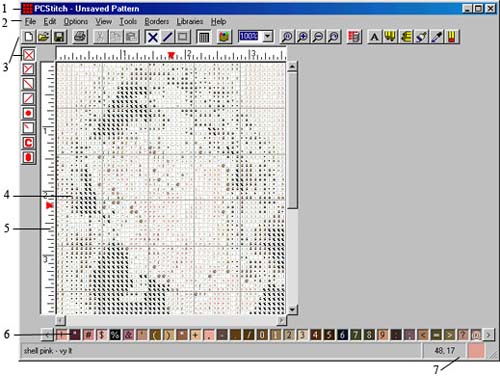
Рис. 1. Окно редактора PCStitch
Основные элементы окна редактора PCStitch: 1 – строка заголовка; 2 – строка меню; 3 – панели инструментов; 4 – окно документа; 5 – линейка; 6 – палитра цветов; 7 – строка состояния.
Меню File(Файл) (рис.2) содержит следующие пункты. New (Новый) – создать новую схему. При создании новой схемы появляется диалоговое окноPattern information (Информация образца) (рис. 3), в котором нужно установить соответствующие параметры. Здесь задается размер (ширина и высота) будущей схемы в дюймах или в стежках. Из раскрывающегося списка Cloth color можно выбрать цвет ткани. Для создания квадратной сетки следует установить флажок Square grid. В диалоговом окне Pattern information также можно указать авторство, заполнив соответствующие поля формы (рис. 3).
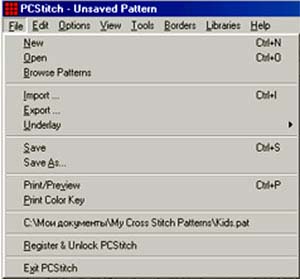
Рис. 2. Меню Файл
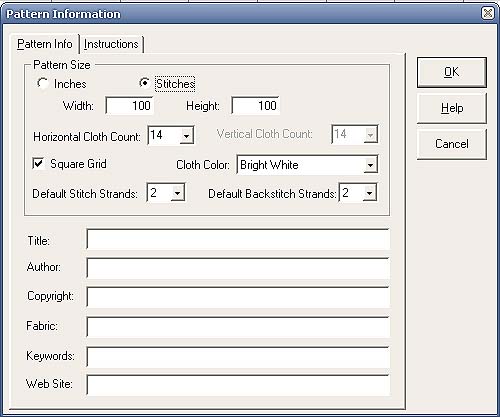
Рис. 3. Диалоговое окно Pattern information
Open (Открыть) – открыть схему на диске. Позволяет открыть схему в формате *.pat из коллекции готовых схем программы или файлы созданные пользователем ранее, которые при желании можно отредактировать средствами графического редактора PCStitch.
Browse Patterns (Обзор схем) – открывает PCStitch Pattern Wiewer, для быстрого просмотра имеющихся схем. Для этого следует указать путь к файлу схемы.
Import (Импорт) вызывает диалоговое окно PCStitch Import Wizard (рис. 4), которое позволяет создавать схемы из любого изображения: из файла, со сканера, камеры, планшета.
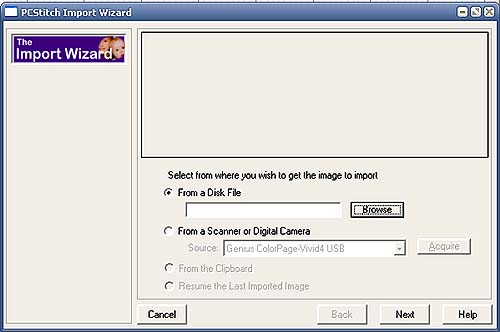
Рис. 4. Диалоговое окно PCStitch Import Wizard
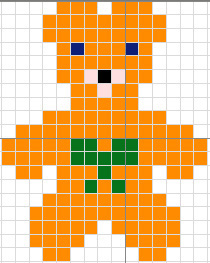
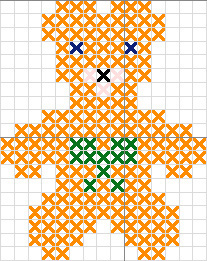
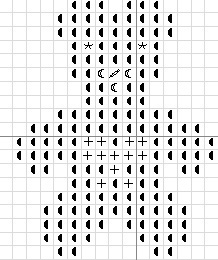
Export (Экспорт) вызывает диалоговое окно Export Pattern(рис.5), в котором следует установить масштаб (Zoom Setting), из раскрывающегося спискаStitches Display As (Отображать стежки как) выбрать один из предложенных вариантов: Colored Squares (Цветные квадраты), Colored Stitches(Цветные стежки), B&W Symbols (Символы), Colored Symbols (Цветные символы), Blocks & Symbols (Блоки и символы), Virtual Stitches (Виртуальные стежки). Здесь можно установить флажки: Display Grid (Отображать сетку), Selected Area Only (Только выбранная область) Save Clipboard(Сохранить в буфер) после чего нажать кнопку Export и в окне предварительного просмотра отобразится результат. Достигнув желаемого результата следует нажать кнопку Save Image (Сохранить изображение), затем кнопку Save Legend (Сохранить легенду). Появляется диалоговое окно Export a PCStitch Pattern в строке Папка выберите имя папки, в которую следует сохранить файл, в строке Имя файла введите имя файла и нажмите кнопкуСохранить.
Таким образом, готовую схему можно сохранить в цветном или черно-белом варианте, в виде квадратов стежков или символов. Изображение (схема) и карта цветов (легенда) сохраняются в разных форматах. Легенда сохраняется в формате *.rtf, а схема – в формате *.bmp. Размер файла занимает несколько мегабайт.
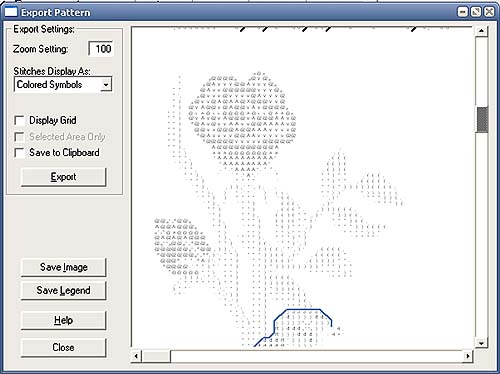
Рис. 5. Диалоговое окно Export Pattern
Save (Сохранить) – сохранить текущую схему с расширением *.pat, которую в дальнейшем можно редактировать.
Save as (Сохранить как) – сохранить текущую схему с расширением *.pat под другим именем, при этом исходный файл остается без изменений.
Print / Preview (Печать / Предварительный просмотр) открывает диалоговое окно Print Pattern (Печать образца) (рис. 6), в котором можно изменить стандартные параметры печати.
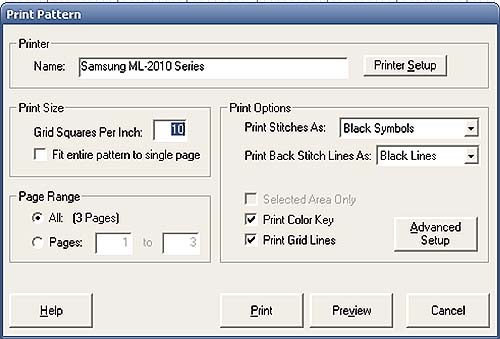
Рис. 6. Диалоговое окно Print Pattern
В поле Grid Square Per Inch (Квадратов сетки в дюйме) можно изменить количество квадратов сетки в дюйме (1 дюйм равен примерно 2,5см). По умолчанию стоит 10 клеточек в 2,5см. Можно изменить значение на 8 или 6, чтобы схема была крупнее.
Если необходимо уместить всю схему на одной странице, то установите флажок Fit entire pattern to single page (Поместить схему целиком на одну страницу).
Из раскрывающегося списка Print stitches As (Печатать стежки как) следует выбрать один из предложенных вариантов Colored Squares (Цветные квадраты), Colored Stitches (Цветные стежки), B&W Symbols (Символы), Colored Symbols (Цветные символы), Blocks & Symbols (Блоки и символы),Virtual Stitches (Виртуальные стежки).
Затем из раскрывающегося списка Print Back Stitch Lines As (Печатать линии шва "назад иголку" как) выберите вариант печати: Black lines (Черные линии), Color lines (Цветные линии) или None – не печатать линии шва.
Далее можно установить необходимые флажки. Selected Area Only (Только выбранная область) в данном случае будет распечатана только заранее выделенная область схемы. Print Color Key (Печатать цветной ключ) будут распечатаны обозначения и номера ниток. Print Gird Lines (Печатать сетку схемы) для удобства работы со схемой желательно установить этот флажок.
Нажатие кнопки Аdvanced setup (Улучшенная установка) вызывает диалоговое окно Options (Опции) в котором можно изменить шрифт легенды, указать нумерацию страниц, выбрать опции ключа: отображать название, номер и количество сложений ниток. Здесь также можно выбрать подходящие нитки.
Нажатие нопки Preview (Предварительный просмотр) в диалоговом окне Print Pattern позволяет увидеть готовый результат, а нажатие кнопки Export page (Экспорт страницы) – постранично сохранять схему и карту цветов в формате *.bmp. Значительно уменьшить размер файла можно в любом графическом редакторе, изменив формат *.bmp. на другой*. jpg или *.gif.
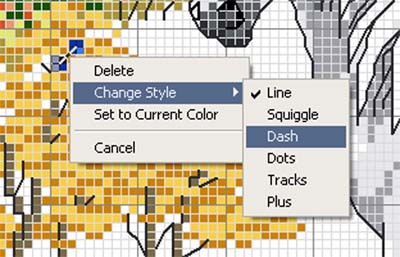
Рис. 7. Контекстное меню
При распечатке схемы следует обратить внимание на то, что на схемах шов “Назад иголку” отображается разными цветами. Чтобы при печати не получить одинаковые черные линии, следует изменить вид этих стежков. Для этого нажмите правой кнопкой мыши на любой шов “Назад иголку” появится контекстное меню (рис. 7.), в котором выберите пункт Change Style (Изменение стиля) и подпункт с понравившейся линией. В этом случае при печати каждому цвету будет соответствовать свой вид линии.
Меню Edit (Правка) содержит следующие пункты (рис.8).
Пункт Undo (Отменить) позволяет отменить последнее действие (сделать шаг назад).
Cut (Вырезать) – стереть какой-либо отмеченный участок.
Команда Copy (Копировать) – помещает выделенный фрагмент схемы в буфер обмена, не вырезая его из документа. Пункт меню Paste (Вставить) – позволяет вставить содержимое буфера.
Команда Select all (Выбрать все) позволяет выделить всю схему.
С помощью команды Flip (Зеркально отобразить) можно зеркально отобразить по горизонтали или вертикали выделенный фрагмент схемы. КомандаRotate (Повернуть) поворачивает схему на 90 и 180 градусов. Команда Erase (Стирание) позволяет стереть фрагмент схемы, предварительно выделив его.
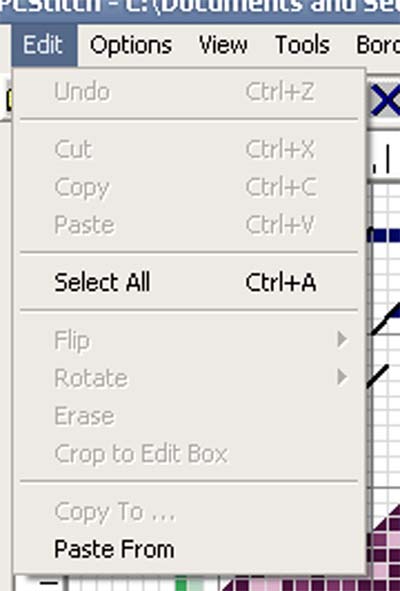
Рис. 8. Меню Edit
Пункт меню Copy To Edit Box (Копировать, чтобы редактировать блок) позволяет вырезать выделенный фрагмент схемы. С помощью команды Copy To (Копировать, чтобы) можно скопировать определенный участок схемы в отдельный файл в формате *.pat. Очень удобная функция в случае, когда нужен только отдельный фрагмент схемы. В этом случае не придется распечатывать схему целиком. Команда Paste Form (Вставить форму) позволяет вставить фрагмент одной схемы в другую. Эта функция представляет интерес при составлении коллажа.
Меню Options (Опции) содержит следующие пункты (рис. 9)
Flexible back Stitching (Гибкий шов “Назад иголку”) следует установить флажок для отображения шва.
Save current Palette as Default (Сохранить текущую палитру по умолчанию) – сохранить палитру, как основную. Сохраните пустую палитру в качестве основной. Это очень удобно и пригодится для набора схем. Программа будет открываться всегда с пустой палитрой. Save Palette (Сохранить палитру) – сохранить какую-либо палитру из схемы в файл с расширением *.fls.
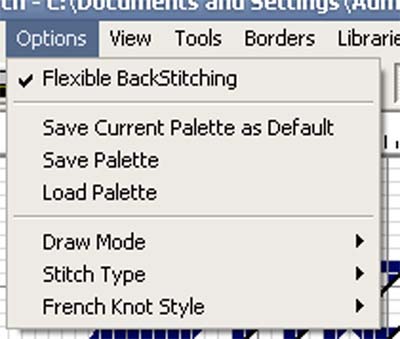
Рис. 9. Меню Options
Load Palette (Загрузить палитру) – загрузить палитру цветов. Draw Mode (Способ рисования) дает возможность выбора способа рисования на схеме (стежки, линии, выделить область). Быстрые кнопки, соответствующие этим пунктам, находятся на панели инструментов. Stitch Type (Тип стежка) – позволяет выбрать тип отображения стежка (кресты, полукресты, 3/4 креста и т.д.). French Knot Style (Стили французского узелка) позволяет отобразить французский узелок различными способами с изменением наклона.
Меню View (Просмотр) (рис. 10) содержит следующие пункты.
View Pattern (Просмотр образца) позволяет просмотреть схему целиком.
Zoom (Изменение масштаба) изменяет, масштаб схемы.
Refresh (Восстановить) позволяет обновить схему.
Следующие пять пунктов меню View (Просмотр): Toolbar (Инструментарий), Stitch Toolbar (Инструментарий стежка), Rulers (Линейка), Status bar(Cтрока состояния), Grid Lines (Линии сетки) служат для включения и выключения режима отображения соответствующих элементов окна программы.
Stitches Display As (Отобразить стежки как) позволяет выбрать вариант отображения стежков на схеме (черно-белые символы, цветные кубики, цветные кубики с символами и т.п.).
Options (Опции) – настройка схемы. Здесь можно поменять линейку в дюймах на линейку в сантиметрах. Поменять цвет фона (канвы), сетку, деление схемы на квадраты (например, 5х5 клеток или 10х10 клеток) и т.д.
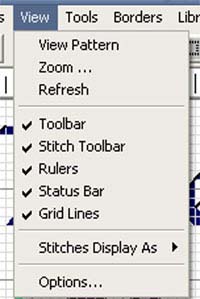
Рис. 10. Меню View
Меню Tools (Инструменты) (рис. 11) содержит следующие пункты.
Mirror Mode – зеркальное отображение, для рисования симметричных крестиков, при этом готовое изображение не меняется.
Paint Once – закрасить область внутри крестиков. Например, имеется квадрат из крестиков, внутри пусто, а нужно закрасить внутреннюю область одним цветом за один раз.
Center – установить центр на схеме.
Erase Mode – режим ластика, стереть участок схемы.
Color Picker – режим пипетки – взять образец цвета.
Pattern Sizing (Калибровка Образца) позволяет добавлять и удалять ряды/колонки.
Palette Tools (Инструменты палитры) позволяет удалять ненужные цвета из палитры, т.е. те цвета, которые не используются в этой схеме, производить расчет ниток, нужных для вышивки данной схемы, метража, количества стежков и т.п.
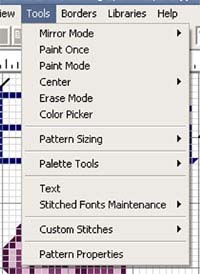
Рис. 11. Меню Tools
Text – ввести текст на схему (рис. 12). Чтобы были русские буквы, пользуйтесь русскими шрифтами, которые можно выбрать из раскрывающегося списка и установите флажок True Type. Если установить флажок Stitched, буквы будут печататься стежками, но к сожалению, только по-английски.
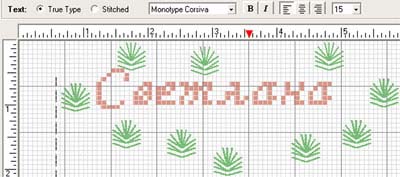
Рис. 12. Размещение текста на схеме
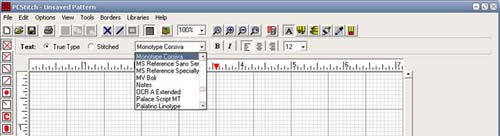
Рис. 13. Выбор шрифта
Stitched Fonts Maintenance – шрифты для вышивки.
Create a New Font –создать свои шрифты для последующих работ.
Open an Existing Font –открыть красивые шрифты.
Select a custom Stitch – выбрать декоративный стежок. Стежки: полукресты, кресты, французкий узелок, звездочка и т.д. (рис. 14).
Define custom Stitch – создать, изменить декоративный стежок.
Patterns Properties – свойства схемы, указание авторства, инструкции к схеме.
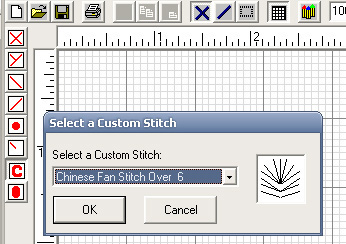
Рис. 14. Выбор декоративного стежка
Libraries (Библиотеки) (рис. 15) содержат много маленьких тематических мотивов, из которых можно создавать собственные схемы.
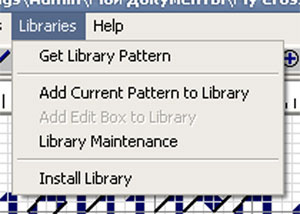
Рис. 15. Меню Libraries
Help (Помощь) (рис. 16) содержит подсказки по работе с программой на английском языке.
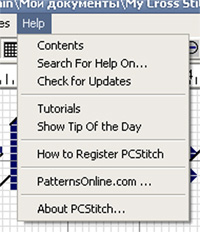
Рис. 16. Меню Help
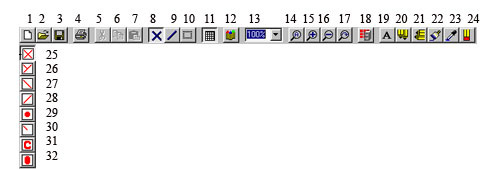
Рис. 17. Панели инструментов PCStitch
Условные обозначения: 1 – создать; 2 – открыть; 3 – сохранить; 4 – печать; 5 – вырезать; 6 – копировать; 7 – вставить; 8 – крест; 9 – шов “назад иголку”; 10 – выделить область; 11 сетка; 12 – палитра цветов; 13 – масштаб; 14 – масштаб определенной, выделенной области; 15 – увеличить; 16 – уменьшить; 17 – вернуться к прежнему масштабу; 18 – вставить образец из библиотеки; 19 – набор текста; 20 – вертикальные зеркальные кресты; 21 – горизонтальные зеркальные кресты; 22 – закрасить пустую область; 23 – пипетка; 24 – ластик; 25 – целые стежки; 26 – три четверти стежка; 27 – верхние полстежка; 28 – нижние полстежка; 29 – французский узел; 30 – четверть стежка; 31 – пользовательский стежок; 32 – цепочки.
Рассмотрим условные обозначения основных инструментов PCStitch (рис. 17). Их функции были подробно проанализированы ранее в описании меню графического редактора.
Создание схемы из готового изображения.
Предварительно подготовьте нужное изображение (например, собственную фотографию), оптимизируйте его с помощью любого графического редактора. Допустимо использование графических файлов различных форматов.
Запустите программу PCStitch.
В меню File выберите пункт Import, при этом вызывается диалоговое окно Import Wizard. В появившемся окне нажмите кнопку Browse, с помощью стандартных способов перемещения по файловой структуре Windows, найдите файл и дважды щелкните на его имени. В области предварительного просмотра отобразится фотография (рис. 18). Нажмите кнопку Next.
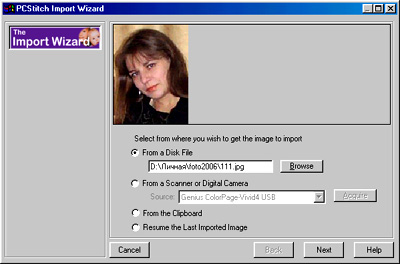
Рис. 18. Диалоговое окно Import Wizard. Шаг 1
Для обрезки изображения, используя левую кнопку мыши, выделите область, необходимую для создания схемы и нажмите кнопку Crop (рис. 19). Кнопка Reset Picture позволяет отменить данное действие. Если результат устраивает, нажимите кнопку Next.
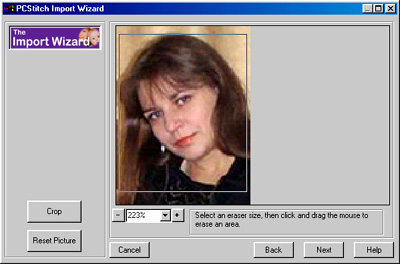
Рис. 19. Диалоговое окно Import Wizard. Шаг 2
Следующий шаг позволяет удалить (стереть) ненужные области изображения. Это можно сделать двумя способами.
Способ 1. Установите переключатель Erase Tool, который предоставляет возможность стирать участки изображения ластиком. Размер ластика выберите из трех предлагаемых вариантов (рис. 20).
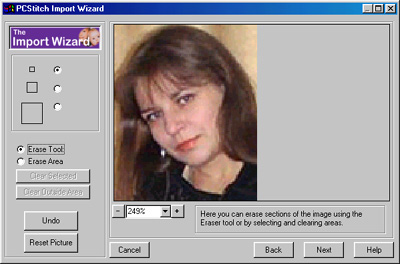
Рис. 20. Диалоговое окно Import Wizard. Шаг 3
Способ 2. Установите переключатель Erase Area, что позволит удалить выделенную область (рис. 21). Форму выделения можно выберите, установив соответствующий переключатель: прямоугольник, овал, произвольная форма. Для выделения квадратной или круглой области необходимо нажать и удерживать клавишу Shift. Переключатель Clear Selected позволяет удалить изображение внутри выделенной области, а Clear Outside Area – вне этой области.
Выполнив необходимые операции, нажмите кнопку Next.
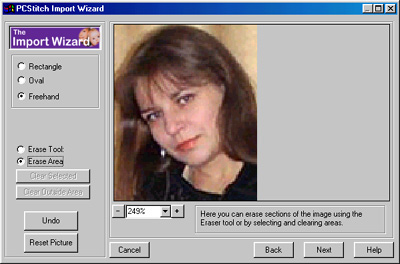
Рис. 21. Диалоговое окно Import Wizard. Шаг 4
Далее необходимо выбрать размер вышивки (рис. 22). Делается это с учетом плотности канвы. Размер канвы задайте в раскрывающемся списке Cloth Count.
Желаемый размер вышивки можно задайте в дюймах (Inches) или крестиках (Stiches), выбрав соответствующий переключатель.
Установка флажка Maintain Aspect позволяет сохранить пропорции рисунка при изменении его размеров, а установка флажка Smooth Colors – сгладить цветовые переходы.
Выполнив необходимые операции, нажмите кнопку Next.
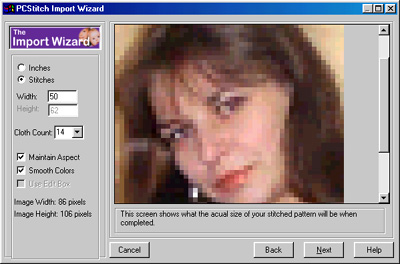
Рис. 22. Диалоговое окно Import Wizard. Шаг 5
Измените некоторые параметры изображения (яркость, контрастность и пр.), выбирая их из списка Color Adjustment и установите с помощью ползунка оптимальное значение каждого из параметров. Нажмите кнопку Apply для отображения предварительного просмотра выполненных изменений (рис. 23 – 25).
Выполнив необходимые операции, нажмите кнопку Next.
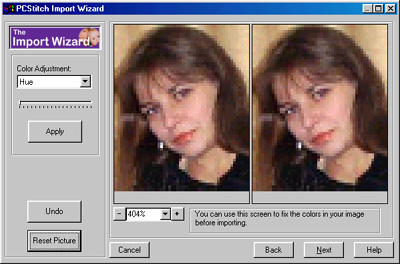
Рис. 23. Диалоговое окно Import Wizard. Шаг 6
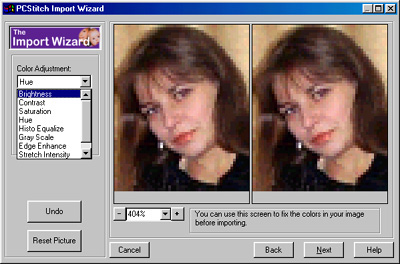
Рис. 24. Диалоговое окно Import Wizard. Шаг 7
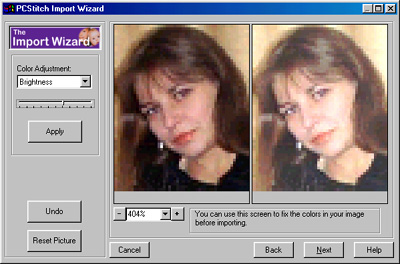
Рис. 25. Диалоговое окно Import Wizard. Шаг 8
Далее из раскрывающегося списка Floss Family выберите тип ниток и в строке Maximum Colors задайте максимальное количество цветов, например, 35 (рис. 26).
Нажмите кнопку Prewiew Pattern, чтобы посмотреть результат. Получив желаемый результат, нажмите кнопку Finish.
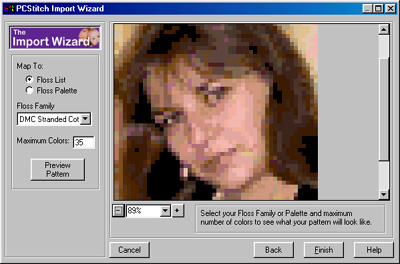
Рис. 26. Диалоговое окно Import Wizard. Шаг 9
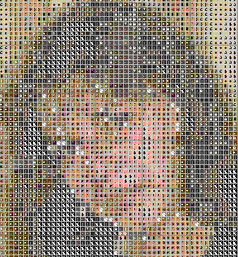
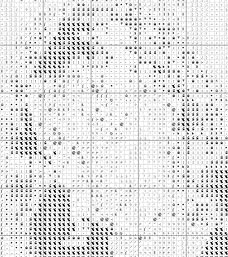
В результате в окне редактора отобразилась цветная схема вышивки (рис. 27). Вариант отображения схемы можно изменить, выполнив команду:View>Stitches Display As и выбрав один из шести предложенных вариантов: Colored Squares (Цветные квадраты) (рис. 27), Colored Stitches (Цветные стежки), B&W Symbols (Символы) (рис. 29 б), Colored Symbols (Цветные символы), Blocks & Symbols (Блоки и символы) (рис. 29 а), Virtual Stitches(Виртуальные стежки) (рис. 29).
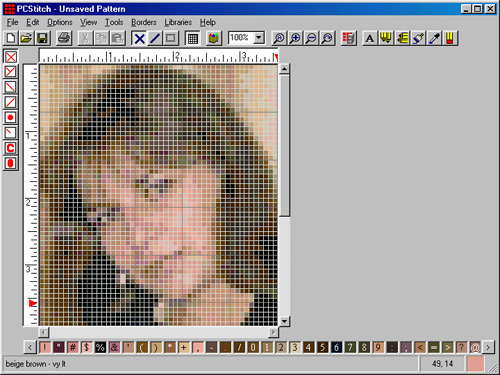
Рис. 27. Цветная схема вышивки в окне редактора
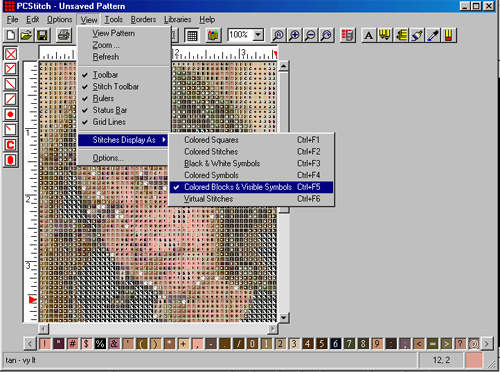
Рис. 28. Изменение варианта отображения схемы
 |
|
а |
 |
|
б |
Рис. 29. Варианты отображения схемы: а – Blocks & Symbols (Блоки и символы); б – B&W Symbols (Символы)
Для осуществления цветовой коррекции схемы выберите необходимый оттенок из палитры цвета (рис. 1.6) и вручную исправьте фрагменты схемы. Тип крестика (крест, полукрест, узелок и др.) задается кнопками 25-32 вертикальной панели инструментов (рис. 17).
С помощью команды Borders > Apply Borders подберите к вышивке рамку из вариантов представленных в библиотеке.
Посмотрите и распечатайте таблицу цветов, выполнив команду File > Pint > Color Key.
Набор схемы в программе PCStitch.
С помощью графического редактора PCStitch можно набрать схему вручную по образцу. Такой способ необходим в следующих случаях:
Возьмите схему, которую необходимо перевести в электронный вид (например, фрагмент схемы “Мишки”) положите ее перед собой. Откройте графический редактор PCStitch.
Выполните команду File (Файл) > New (Новый), в появившемся диалоговом окне Pattern information (Информация образца) (рис. 3) укажите размеры будущей схемы (в нашем случае 20х20) в стежках. Если размер задан неточно, можно приблизительно подсчитать его по сетке на схеме. Для увеличения или уменьшения пространства схемы в меню Tools (Инструменты) выберите пункт Pattern Sizing (Калибровка Образца) и подпункт Add Rows/Columns (Добавить ряды/колонки) или Delete Rows/Columns (Удалить ряды/колонки).
Для набора схемы необходимы определенные цвета из палитры ниток – те, что указаны в карте цвета к схеме. Используя инструмент Bring Up Floss Palette вызовите диалоговое окно Floss Palette (Палитра ниток) (рис. 30-31).
Затем полностью очистите палитру от ненужных цветов с помощью кнопки Remove (Удаление) во вкладке Floss Properties (Свойства ниток) (рис. 31). Чтобы не повторять эту процедуру в дальнейшем, сохраните пустую палитру с одним цветом, выполнив команду Options (Опции) > Save Current Palette as Default (Сохранить палитру, как основную). Теперь программа всегда будет запускаться с пустой палитрой.
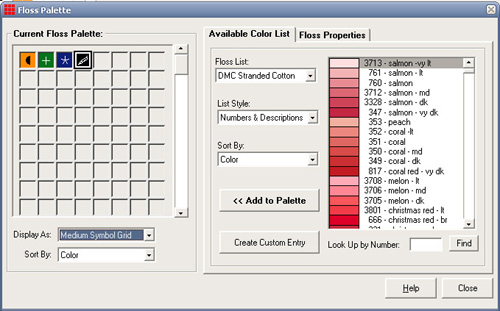
Рис. 30. Диалоговое окно Floss Palette с открытой вкладкой Available Color List
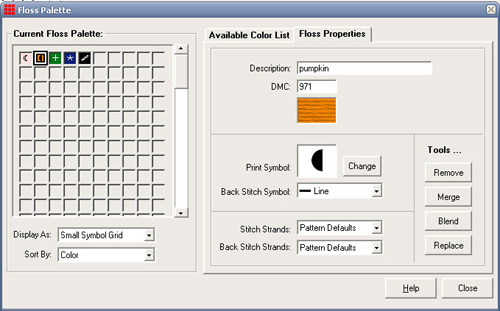
Рис. 31. Диалоговое окно Floss Palette с открытой вкладкой Floss Properties
Подробнее рассмотрим диалоговое окно Floss Palette (Палитра ниток) (рис. 30–31).
Слева расположена Current Floss Palette (Текущая палитра ниток), отображающая цвета ниток, которые будут использованы в набираемой схеме, а справа – две вкладки. Вкладка Available Color List (Список доступных цветов) содержит Floss List (Список ниток) полная палитра цветов ниток (DMC, DMC-вискоза, J&P Coats, Anchor и др.). Здесь же располагаются списки, в которых можно выбрать нужный цвет из палитры, а также способ отображения и сортировки цветов палитры. В правом нижнем углу расположена строка Look Up by Number (Поиск по номеру), в которую вводят номер нужного цвета ниток и нажимают кнопку Find (Найти). Так осуществляется быстрый поиск цвета ниток по номеру.
Нажмите кнопку Add to Palette (Добавить в палитру), чтобы добавить выбранный цвет в схемы, появляется диалоговое окно Select a Symbol (Выбор символа), в котором можно выбрать условное обозначение данного цвета.
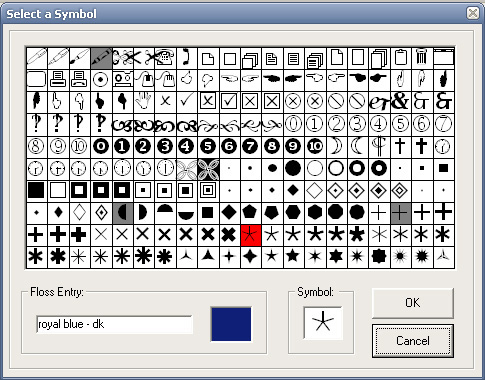
Рис. 32. Диалоговое окно Select a Symbol
Вкладка Floss Properties (Свойства ниток) (рис. 31) содержит подробную информацию о цвете нити, его символьном обозначении, которое можно менять, нажав кнопку Change (Изменить). В этой вкладке также задается количество нитей на один крестик (от 1 до 6). Если есть шов “назад иголку” того же цвета, можно сразу присвоить ему символ.
Вернемся к набору схемы. Внимательно изучите карту цветов на схеме, последовательность и условные обозначения цветов. Удобно работать, если и на исходной схеме и в программе одному и тому же цвету соответствуют одинаковые условные обозначения. Обратите внимание на символьные обозначения цвета в редакторе. Возможно, здесь вы найдете аналогичные тем, что есть на схеме, которую вам предстоит набирать.
В главном окне программы можно изменить шрифт. Для этого нажмите правой кнопкой мыши на любой цвет палитры, расположенной в нижней части окна программы и в контекстном меню выберите пункт Change Symbol Font (Изменить символьный шрифт) (рис. 33). В открывшемся диалоговом окнеШрифт выберите подходящий символьный шрифт.
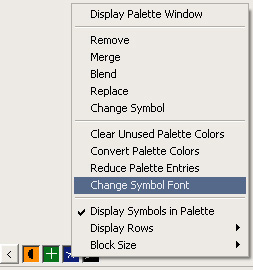
Рис. 33. Контекстное меню палитры цветов
Для добавления цветов в текущую палитру ниток выберите в Палитре цветов необходимый цвет нажмите кнопку Add To Pallete, появляется диалоговое окно Select a Symbol (Выбор символа), в котором выберите условное обозначение данного цвета по возможности сходное с символом имеющейся схемы и нажмите кнопку ОК. Повторяя эти операции, заполните текущую палитру необходимыми цветами. Когда все цвета будут добавлены, нажмите кнопку Close (Закрыть). Затем сохраните файл будущей схемы, присвоив ей имя.
Приступайте к набору схемы. Набирайте схему символами и цветом одновременно, выполнив команду View (Просмотр) > Stitches Display As (Отобразить стежки как) > Colored Bloks & Visible Symbols (Цветные блоки и видимые символы) (рис. 34).
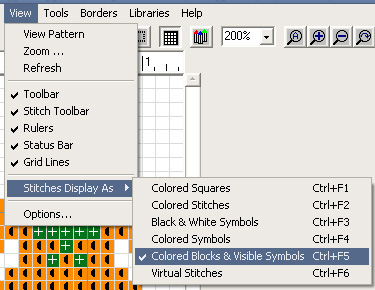
Рис. 34. Выбор варианта отображения схемы
Если при наборе схемы возникают ошибки, то удалите их, используя пункт контекстного меню Erase Stitch (Стереть стежок).
Когда будете рисовать шов “назад иголку” не забудьте включить режим Options (Опции) > Flexible BackStitching (Гибкий шов “назад иголку”). Если он будет отключен, будет трудно нарисовать швы.
При наборе схемы ориентируйтесь по сетке, которая поделена на квадраты 10х10. Не забывайте периодически сохранять схему.
После окончания работы, сохраните схему в одном из вариантов отображения (рис. 35).
 |
 |
 |
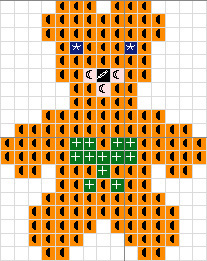 |
Рис. 35. Варианты отображения схемы
Выполняя вышеописанные операции можно также создавать свои собственные схемы, не пользуясь образцами.

| Рубрики: | Вышивка |
| Комментировать | « Пред. запись — К дневнику — След. запись » | Страницы: [1] [Новые] |


